

カレンダーの作成
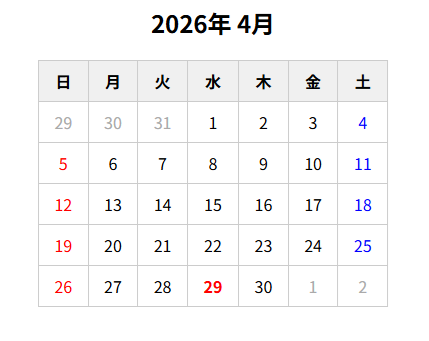
コード
index.html
<!DOCTYPE html>
<html lang="ja">
<head>
  <meta charset="UTF-8">
  <meta name="viewport" content="width=device-width, initial-scale=1.0">
  <title>Document</title>
  <link rel="stylesheet" href="./style.css">
  <script src="./script.js"></script>
</head>
<body>
  <h2 id="month"></h2>
  <table id="calendar">
    <thead>
      <tr>
        <th>日</th><th>月</th><th>火</th><th>水</th>
        <th>木</th><th>金</th><th>土</th>
      </tr>
    </thead>
    <tbody></tbody>
  </table>
</body>
</html>
script.js
window.onload = function() {
  const today = new Date(2026, 3); // 2026年4月のデータ作成

  const year = today.getFullYear(); // 2026
  const month = today.getMonth(); // 4

  const monthTitle = document.getElementById('month');
  const tbody = document.querySelector('#calendar tbody');

  const holidays = {
    "2026": [
      { date: '2026-01-01', name: '元日' },
      { date: '2026-01-12', name: '成人の日' },
      { date: '2026-02-11', name: '建国記念の日' },
      { date: '2026-02-23', name: '天皇誕生日' },
      { date: '2026-03-20', name: '春分の日' },
      { date: '2026-04-29', name: '昭和の日' },
      { date: '2026-05-03', name: '憲法記念日' },
      { date: '2026-05-04', name: 'みどりの日' },
      { date: '2026-05-05', name: 'こどもの日' },
      { date: '2026-05-06', name: '振替休日' },
      { date: '2026-07-20', name: '海の日' },
      { date: '2026-08-11', name: '山の日' },
      { date: '2026-09-21', name: '敬老の日' },
      { date: '2026-09-22', name: '振替休日' },
      { date: '2026-09-23', name: '秋分の日' },
      { date: '2026-10-12', name: 'スポーツの日' },
      { date: '2026-11-03', name: '文化の日' },
      { date: '2026-11-23', name: '勤労感謝の日' }
    ]
  }


  const yearStr = String(year); // 表示中の年

  // 「書きやすさ・読みやすさ」のために Map を使用
  // 年ごとに一度だけ作る
  const holidayMap = new Map(
    holidays[yearStr]?.map(h => [h.date, h.name]) ?? []
  );

  // 表示月タイトル
  monthTitle.textContent = `${year}年 ${month + 1}月`;

  // 今月1日の曜日
  const firstDay = new Date(year, month, 1).getDay(); // 3

  // 今月の日数
  const lastDate = new Date(year, month + 1, 0).getDate(); // 30

  // 前月の日数
  const prevLastDate = new Date(year, month, 0).getDate(); // 31

  let row = document.createElement('tr');

  //
  // ① 前月の日付
  //
  for (let i = firstDay - 1; i >= 0; i--) {
    const cell = document.createElement('td');
    cell.textContent = prevLastDate - i;
    cell.classList.add('other-month');
    row.appendChild(cell);
  }

  //
  // ② 当月の日付
  //
  for (let day = 1; day <= lastDate; day++) {
    const cell = document.createElement('td');
    cell.textContent = day;

    const dateKey = `${year}-${String(month + 1).padStart(2, '0')}-${String(day).padStart(2, '0')}`;

    // 祝日判定
    if (holidayMap.has(dateKey)) {
      cell.classList.add('holiday');
      cell.title = holidayMap.get(dateKey); // ホバーで祝日名表示
    }

    const weekDay = (firstDay + day - 1) % 7;

    // 日曜・土曜の色分け
    if (weekDay === 0) {
      cell.classList.add('sunday');
    } else if (weekDay === 6) {
      cell.classList.add('saturday');
    }

    // 今日の強調
    if (
      year === today.getFullYear() &&
      month === today.getMonth() &&
      day === today.getDate()
    ) {
      cell.classList.add('today');
    }

    row.appendChild(cell);

    if ((firstDay + day) % 7 === 0) {
      tbody.appendChild(row);
      row = document.createElement('tr');
    }
  }

  //
  // ③ 翌月の日付
  //
  // 翌月の1日が何曜日か?
  const endDay = (firstDay + lastDate) % 7; // 5
  let nextMonthDay = 1;

  // 最終日の次の日が日曜日以外ならtdタグを追加
  if (endDay !== 0) {
    for (let i = endDay; i < 7; i++) {
      const cell = document.createElement('td');
      cell.textContent = nextMonthDay++;
      cell.classList.add('other-month');
      row.appendChild(cell);
    }
  }

  // 最終行を追加
  tbody.appendChild(row);

}
CSS
style.css
#month {
  text-align: center;
}
table {
  border-collapse: collapse;
  width: 350px;
}
th, td {
  border: 1px solid #ccc;
  text-align: center;
  padding: 8px;
}
th {
  background: #f0f0f0;
}
.other-month {
  color: #aaa;
}
.today {
  background: #ffeb3b;
}
.holiday {
  color: red;
  font-weight: bold;
}
.sunday {
  color: red;
}
.saturday {
  color: blue;
}
#calendar {
  margin: 0 auto;
}
.calendar-header {
  display: flex;
  justify-content: center;
  gap: 10px;
  margin-bottom: 10px;
}
.calendar-header #yearSelect {
  font-size: 22px;
  padding: 2px;
}
.calendar-header #monthSelect {
  font-size: 22px;
  padding: 2px;
}
曜日番号
getDay()で取得した値の曜日は以下になります。
- 0:日
- 1:月
- 2:火
- 3:水
- 4:木
- 5:金
- 6:土
① 前月の日付
「 firstDay - 1 」で2026年3月末日の曜日を取得します。
2026年4月1日が「 水曜日 」のため、firstDay に入る値は3です。そのため「 firstDay - 1 」で2026年3月末日の曜日を取得することができます。
「 firstDay - 1 」は2のため、2026年3月末は「 火曜日です。 」
for (let i = firstDay - 1; i >= 0; i--) {
  const cell = document.createElement('td');
  cell.textContent = prevLastDate - i;
  cell.classList.add('other-month');
  row.appendChild(cell);
}
上記のコードは、変数iは2から始まり、デクリメントのため0になるまで繰り返します。そのため実行される回数は「 3回 」です
2026年3月の日数は変数prevLastDateに代入されています。日数は31日です。
最初のループの際に「 cell.textContent 」で挿入される文字は「 31 - 2 」のため「 29 」です。
ループがデクリメントのためループの際、「 31 - 2 」、「 31 - 1 」、「 31 - 0 」と引く数が減るため前月の日付が取得できます。
② 当月の日付
1日から月末までループで処理します。ループの主な目的はtd要素に日付のテキストを挿入することです。「 row.appendChild(cell) 」の部分です。
土曜日になった場合の処理を以下のコードで処理ています。
if ((firstDay + day) % 7 === 0) {
  tbody.appendChild(row);
  row = document.createElement('tr');
}
上記のコードは、土曜日になれば、変数tbodyに変数rowの値を最後に挿入します。挿入した後、変数rowに「 document.createElement('tr') 」で新たに要素を作成し、空のtr要素を代入しなおします。
const dateKey = `${year}-${String(month + 1).padStart(2, '0')}-${String(day).padStart(2, '0')}`;

// 以下のデータが作成されます
2026-04-01
padStart()は、第1引数で指定した文字の長さで第2引数の文字を繰り返します。
③ 翌月の日付
翌月の処理を行っているのは、以下のコードです。
const endDay = (firstDay + lastDate) % 7; // 5
let nextMonthDay = 1;

 if (endDay !== 0) {
  for (let i = endDay; i < 7; i++) {
    const cell = document.createElement('td');
    cell.textContent = nextMonthDay++;
    cell.classList.add('other-month');
    row.appendChild(cell);
  }
}
firstDay + lastDate の結果は「 3 + 30 = 33 」です。翌月1日まで曜日を進めた量を求めることができます。
その値を7で割ったあまりが2026年5月1日の曜日になります。
※以下の画像の日付下の赤文字が曜日の量になります。
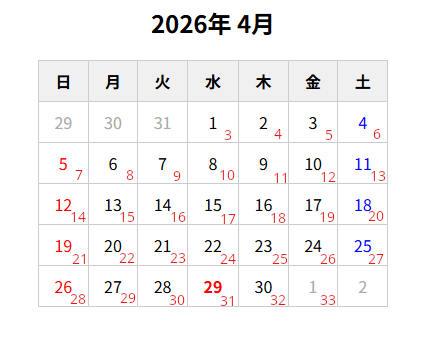
翌月1日が日曜日以外ならtd要素を挿入するようにします。
2026年5月1日は金曜日のため、変数endDayは5です。そのためtd要素は2つ挿入されます。
翌月のスタート日は1日からになるため変数nextMonthDay に1を代入しおき、ループごとにインクリメントし日付のテキストを挿入します。